Android Modular Scroll Containers: From ViewTypes to Section Engines
Starting point
In ecommerce apps, pages such as the home page, cart, and wishlist often share one trait: they are built by vertically stitching together multiple business modules. Operational slots, horizontal product recommendations, “You may also like,” dynamic containers - each module has its own data source, pagination logic, and loading state.
The most common implementation is a single RecyclerView with one Adapter and multiple ViewTypes. This works when the number of modules is small, but as the business grows, several problems start to appear:
- All module state is coupled inside the same Adapter, so changing one module can affect others.
- Pagination logic is centralized, making it hard to tell which module should load more data.
- Modules cannot be tested independently and cannot be reused across pages.
- Dynamically inserting or removing modules, such as for A/B experiments, requires many Adapter changes.
The root cause is this: the module is modeled as a ViewType instead of as an independent component. A ViewType is a rendering-layer concept. It cannot carry a module’s lifecycle, data management, or paging capability.
Core principle: one scroll axis, multiple data sources
Before getting into the architecture, establish one hard rule:
Keep exactly one vertical scroll container.
No business module is allowed to become its own vertical scroll container. A module should only output a list of displayable Items. Scrolling belongs to the outermost RecyclerView.
Horizontal modules, such as banners and horizontal product lists, are valid because they scroll in a different direction and do not conflict with the main vertical axis. However, a horizontal RecyclerView must disable nested scrolling with setNestedScrollingEnabled(false).
This rule keeps scrolling behavior predictable. Once vertical nested scrolling appears, gesture conflicts, interrupted fling behavior, abnormal height measurement, and other hard-to-fix issues follow quickly.
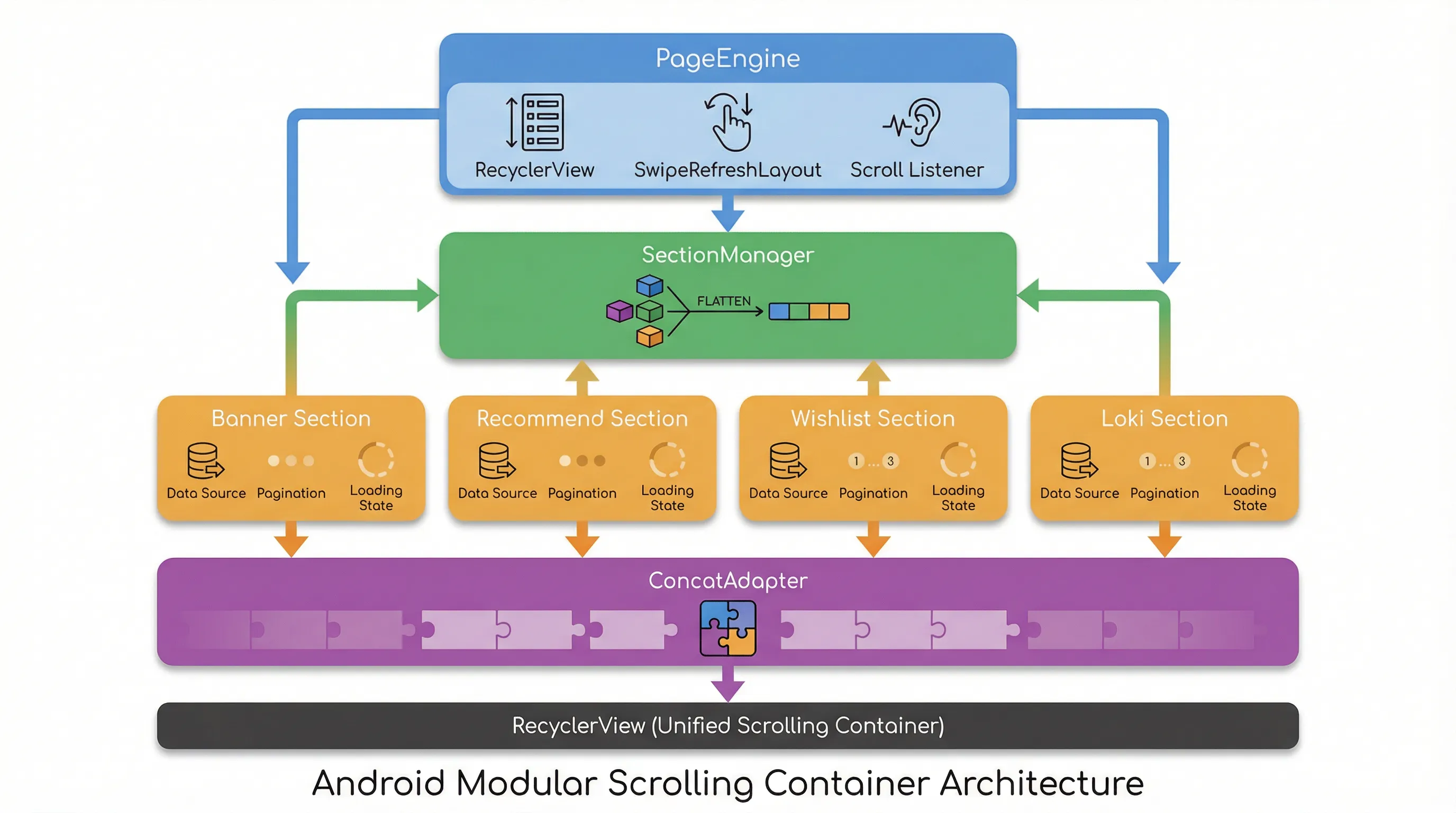
Three layers of abstraction: Section, SectionManager, and PageContainer
To move the abstraction from UI implementation to page structure, introduce three core concepts.
Section: the smallest module unit
A Section is the basic building block of a page. An operational slot is a Section, “You may also like” is a Section, and a dynamic container inside the cart can also be a Section.
Each Section is responsible for:
- Managing its own data source
- Controlling its own pagination logic
- Maintaining its own loading state, such as Idle -> Loading -> Loaded -> Error
- Outputting
List<SectionItem>to the outside
It does not care about RecyclerView, does not operate the Adapter, and does not know its position on the page. It answers one question only: “How many pieces of content should I output to the page right now?”
abstract class Section {
    abstract val items: List<SectionItem>
    abstract val state: SectionState
    abstract fun loadInitial()
    abstract fun loadMore()
    abstract fun reset()
    abstract val hasMore: Boolean
}
SectionItem: a unified display contract
All module output is wrapped as SectionItem. It carries a string type identifier and a unique ID:
data class SectionItem(
    val type: String,
    val id: String,
    val data: Any
)
Using a string type instead of an integer viewType prepares the system for a rendering registry and SDK-style reuse. A recommended unique ID format is {sectionId}_{itemIndex}, which prevents cross-module collisions during DiffUtil calculation.
SectionManager: the data stitching engine
SectionManager owns an ordered list of Sections and flattens all Section Items into one complete list:
class SectionManager {
    private val sections = mutableListOf<Section>()

    fun flattenItems(): List<SectionItem> {
        return sections.flatMap { it.items }
    }

    fun notifyDataChanged() {
        val newList = flattenItems()
        // Use DiffUtil to calculate changes and update the Adapter.
    }
}
When any Section changes, SectionManager rebuilds the flattened list and triggers a differential update. The Adapter itself contains no business logic. It only looks up the matching ViewHolder by SectionItem.type and renders it.
Introducing ConcatAdapter for module-level isolation
Google’s ConcatAdapter natively supports linearly stitching multiple Adapters together. Each module owns an independent Adapter, manages its own ViewTypes and data set, and then ConcatAdapter combines them into one RecyclerView data source.
Compared with a single Adapter plus multiple ViewTypes, ConcatAdapter provides ViewType isolation and stable ID isolation. ViewType 0 in module A does not conflict with ViewType 0 in module B.
Enable the isolation policies in the configuration:
val config = ConcatAdapter.Config.Builder()
    .setIsolateViewTypes(true)
    .setStableIdMode(ConcatAdapter.Config.StableIdMode.ISOLATED_STABLE_IDS)
    .build()

val concatAdapter = ConcatAdapter(config, sectionAdapterA, sectionAdapterB, sectionAdapterC)
However, ConcatAdapter is only a rendering container. It does not provide paging orchestration, refresh coordination, lazy loading, or unified loading-state management. If every Adapter requests data and handles paging independently, full-page refresh becomes hard to coordinate, paging triggers become messy, and loading-state UI becomes inconsistent.
The solution is to add a scheduling layer above ConcatAdapter: PageEngine.
PageEngine: the page-level scheduler
PageEngine is the center of the architecture. It manages the lifecycles of the RecyclerView, SwipeRefreshLayout, and all SectionControllers.
class PageEngine(
    private val recyclerView: RecyclerView,
    private val swipeRefreshLayout: SwipeRefreshLayout
) {
    private val sections = mutableListOf<SectionController>()
    private val concatAdapter = ConcatAdapter(config)

    fun addSection(section: SectionController) {
        sections.add(section)
        concatAdapter.addAdapter(section.adapter)
    }

    fun removeSection(section: SectionController) {
        sections.remove(section)
        concatAdapter.removeAdapter(section.adapter)
    }
}
SectionController: an upgraded module abstraction
The simple Section data source evolves into a SectionController, giving each module full lifecycle management:
abstract class SectionController {
    abstract val adapter: RecyclerView.Adapter<*>
    var state: SectionState = SectionState.IDLE
        protected set

    abstract fun loadInitial()
    abstract fun loadMore()
    abstract val hasMore: Boolean

    fun resetToIdle() {
        state = SectionState.IDLE
        adapter.submitList(emptyList())
    }
}
SectionController does not depend directly on an Activity or Fragment. All external dependencies are injected through PageContext. This makes modules independently testable, reusable across pages, and even extractable into a standalone SDK.
class PageContext(
    val lifecycleOwner: LifecycleOwner,
    val coroutineScope: CoroutineScope,
    val tracker: ExposureTracker?
)
Paging control at module granularity
Traditional paging usually listens for the RecyclerView reaching the bottom and then triggers a global loadMore. In a section-based architecture, paging becomes module-scoped.
The PageEngine scroll listener changes to this: find the last loaded Section that still has more data, then call its loadMore().
recyclerView.addOnScrollListener(object : RecyclerView.OnScrollListener() {
    override fun onScrolled(rv: RecyclerView, dx: Int, dy: Int) {
        val layoutManager = rv.layoutManager as LinearLayoutManager
        val lastVisible = layoutManager.findLastVisibleItemPosition()
        val total = concatAdapter.itemCount

        if (lastVisible >= total - PRELOAD_THRESHOLD) {
            val target = sections.lastOrNull {
                it.state == SectionState.LOADED && it.hasMore
            }
            target?.loadMore()
        }
    }
})
With this design, an operational section does not keep paging after it has finished loading. Only infinite-paging modules such as recommendations continue loading when the user scrolls near the bottom.
Lazy loading modules on demand
When a page contains eight or more modules, firing all initial requests at once creates unnecessary network cost and delays the first screen. The fix is module lazy loading: call loadInitial() only when a module is about to enter the visible area.
Each SectionController starts in IDLE instead of loading immediately. PageEngine calculates the start position of each Section in the list during scroll handling. When that position approaches the visible area, it triggers loading:
private fun checkLazyLoad() {
    var offset = 0
    val lastVisible = layoutManager.findLastVisibleItemPosition()

    for (section in sections) {
        val sectionStart = offset
        offset += section.adapter.itemCount

        if (section.state == SectionState.IDLE
            && sectionStart <= lastVisible + PRELOAD_THRESHOLD) {
            section.loadInitial()
        }
    }
}
Set PRELOAD_THRESHOLD to roughly the number of Items in one screen. When the user is one screen away from the module, loading begins. By the time the user reaches it, the data is ready and the experience is smoother.
Full-page pull-to-refresh strategy
When SwipeRefreshLayout triggers, PageEngine does not need to refresh every module at the same time. A better strategy is:
- Call
loadInitial()only on the first Section to perform the real refresh. - Call
resetToIdle()on the remaining Sections to clear their data and return them toIDLE. - When the user scrolls down, lazy loading naturally loads those modules again.
fun onRefresh() {
    sections.forEachIndexed { index, section ->
        if (index == 0) {
            section.loadInitial()
        } else {
            section.resetToIdle()
        }
    }
}
resetToIdle() only clears Adapter data. It does not remove the module from ConcatAdapter. Removing it would disturb position mapping and cause unpredictable layout jitter.
After all Sections finish reloading, PageEngine closes the refresh animation through a counter:
private var pendingRefreshCount = AtomicInteger(0)

fun onSectionLoaded(section: SectionController) {
    if (pendingRefreshCount.decrementAndGet() <= 0) {
        swipeRefreshLayout.isRefreshing = false
    }
}
Handling horizontal modules
Operational modules often contain horizontal banners or horizontal product recommendations. In a section-based architecture, a horizontal list is simply the internal structure of a ViewHolder for one SectionItem.
That Section outputs a SectionItem with type horizontal_list, and the corresponding ViewHolder embeds a horizontal RecyclerView. The core container does not need to know that it is horizontal. At the data layer, it is no different from any other Item.
Pay attention to three points:
- Call
setNestedScrollingEnabled(false)on the horizontalRecyclerView. - Set a fixed height to avoid repeated measurement by the outer
RecyclerView. - Keep the horizontal list data managed by its owning Section. Do not let it make independent requests.
Rendering registry for real componentization
A traditional Adapter creates ViewHolders in onCreateViewHolder through a when (viewType) branch. Every new type requires modifying Adapter code. A rendering registry, ItemRegistry, extracts ViewHolder creation from the Adapter and lets modules register themselves:
object ItemRegistry {
    private val binders = mutableMapOf<String, ItemBinder<*>>()

    fun register(type: String, binder: ItemBinder<*>) {
        binders[type] = binder
    }

    fun getBinder(type: String): ItemBinder<*> {
        return binders[type] ?: throw IllegalStateException("Unregistered type: $type")
    }
}
Adding a new business module now requires only three steps: implement a SectionController, register the corresponding ItemBinder, and insert the Section into the page. The core container code does not change.
Toward data-driven page structure
Once module registration and creation are both handled by registries, the page structure can be driven by configuration. The backend can send JSON that defines which modules a page contains, their order, and whether they are enabled:
{
  "sections": [
    { "type": "banner", "config": {} },
    { "type": "recommend", "config": { "pageSize": 20 } },
    { "type": "wishlist", "config": {} }
  ]
}
The client uses SectionFactory to dynamically create the corresponding SectionController and inject it into PageEngine. This allows the home page, wishlist page, and cart page to reuse the same container engine. Page differences are fully controlled by configuration. A/B experiments also become simpler: replace the module type in the config, without shipping a new app version.
Performance-critical points
stableId must be enabled. After ConcatAdapter is configured with ISOLATED_STABLE_IDS, each child Adapter manages stable IDs independently, avoiding cross-module ID conflicts. This is the foundation for efficient RecyclerView reuse.
Diff calculation should happen at the SectionItem level. Each child Adapter uses ListAdapter plus DiffUtil and compares only its own module’s Item list. There is no need for global cross-module sorting or insertion. ConcatAdapter naturally supports this block-stitching model.
Only load the first-screen modules initially. With lazy loading, only modules visible on the first screen send network requests when the page opens. Later modules load on demand. This significantly reduces first-screen latency and backend pressure.
Common traps
-
Embedding a vertical RecyclerView inside a Section. This violates the one-scroll-axis principle. Even if
NestedScrollViewmakes it appear to work, fling and touch-event problems will eventually surface. The correct approach is to let the Section output multipleSectionItems and let the outer container render them. -
Writing business logic in the Adapter. The Adapter’s responsibility is rendering only. Data requests, state management, and pagination should live in
SectionController. -
Removing and re-adding child Adapters during refresh.
ConcatAdapterposition mapping depends on a stable child Adapter list. Refresh should clear data only, not change the Adapter composition. -
Putting pagination logic in the Activity or Fragment. Paging triggers should be scheduled by
PageEngine. Modules expose paging capability throughSectionController.hasMoreandloadMore(). The Activity should not participate directly.
Architecture evolution path
This architecture can be adopted in phases, from simple to complex:
| Stage | Approach | Best fit |
|---|---|---|
| Basic | Single Adapter plus multiple ViewTypes | No more than 3 modules, simple logic |
| Intermediate | ConcatAdapter plus SectionController | 3 to 8 modules, module-level paging and reuse needed |
| Advanced | PageEngine plus ItemRegistry plus lazy loading | 8 or more modules, dynamic insertion and configuration needed |
| Enterprise | Flow-driven state plus remote config plus SDK packaging | Multi-team collaboration, modules reused across apps |
The right stage depends on team size and business complexity. For a one- or two-person team, jumping straight to the enterprise version can cost more than it returns. But keeping extension points in the design, such as string type instead of integer viewType, and keeping SectionController independent from Activity, lets the architecture evolve later with minimal cost.
The final result looks like this: